We are so excited to announce Ferron 2 - a fast, modern, and easily configurable web server with automatic TLS.
Why Ferron 2?
After we got suggestions from the community, we have decided to rewrite the Ferron web server to apply the suggestions. We have ended up with a faster, easier to use, and more powerful web server.
Ease of use
Ferron 2 now supports KDL configuration format as an easier-to-configure format compared to Ferron 1.x YAML configuration.
Below is an example Ferron 2 KDL configuration:
example.com {
  proxy "http://localhost:3000"
}
Below is an equivalent Ferron 1.x YAML configuration:
global:
  secure: true
  enableAutomaticTLS: true
  automaticTLSContactCacheDirectory: "/var/cache/ferron-acme" # Replace "/var/cache/ferron-acme" with actual cache directory. Optional property, but recommended
  loadModules:
    - "rproxy"

hosts:
  - domain: "example.com" # Replace "example.com" with your website's domain name
    proxyTo: "http://localhost:3000"
As you have seen above, Ferron 2 KDL configuration is less verbose than Ferron 1.x YAML configuration for a single reverse proxy host with automatic TLS enabled.
If you would like to translate Ferron 1.x YAML configuration to Ferron 2 KDL configuration, you can do so with ferron-yaml2kdl command that comes with Ferron:
ferron-yaml2kdl ferron.yaml ferron.kdlAutomatic TLS improvements
Ferron 2 will enable automatic TLS by default for hosts without ports specified.
The person who created Caddy web server even posted about this on X/Twitter, even when we were just getting started on the rewrite.
Below is an example Ferron 2 KDL configuration for a host with automatic TLS enabled:
example.com {
  root "/var/www/example.com"
}
Optimized performance
Ferron 2 also brings more optimized performance compared to Ferron 1.x. Below are performance benchmark results comparing Ferron 1.x, two Ferron 2 beta versions, and Caddy.
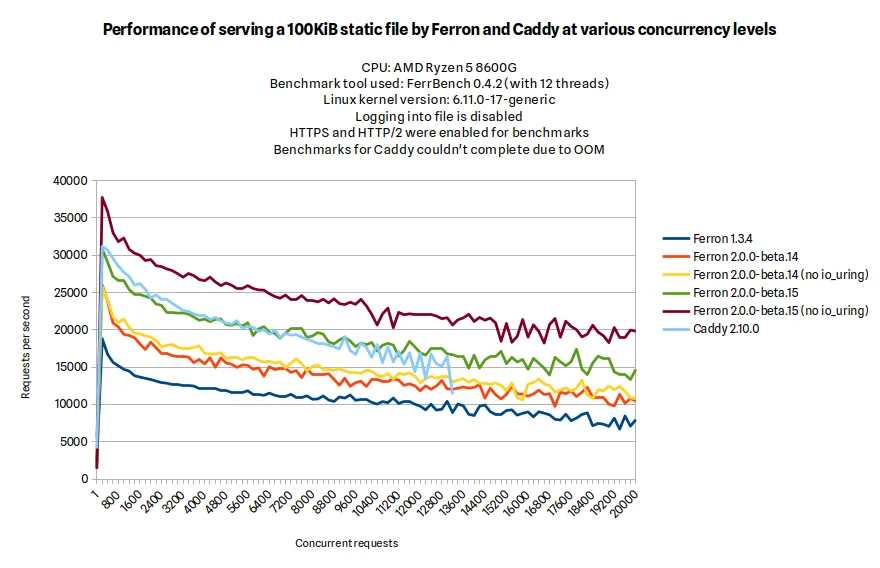
As you have seen above, Ferron 2.0.0-beta.15 (a beta version of Ferron 2) had higher throughput at static file serving than Ferron 1.3.4, and comparable throughput as Caddy (when io_uring was disabled, the throughput was even higher).
As these results are for beta versions of Ferron 2, they may not be representative of the final release. However, they do provide a good indication of the performance improvements that Ferron 2 offers over Ferron 1.x.
How can I install Ferron 2?
There are multiple official ways to install Ferron 2:
How can I upgrade from Ferron 1.x?
If you installed Ferron 1.x using the official installer for GNU/Linux, you can upgrade to Ferron 2.x by running the following command:
sudo bash -c "$(curl -fsSL https://get.ferron.sh/v1-to-v2)"How can I configure Ferron 2?
You can configure Ferron 2 by editing the ferron.kdl file in a location dependent on how you installed it. You can also read the configuration reference to learn more about the available configuration directives.
Thank you!
We appreciate all the feedback and contributions from our community. Your support helps us improve Ferron with each release. Thank you for being a part of this journey!
The Ferron Team